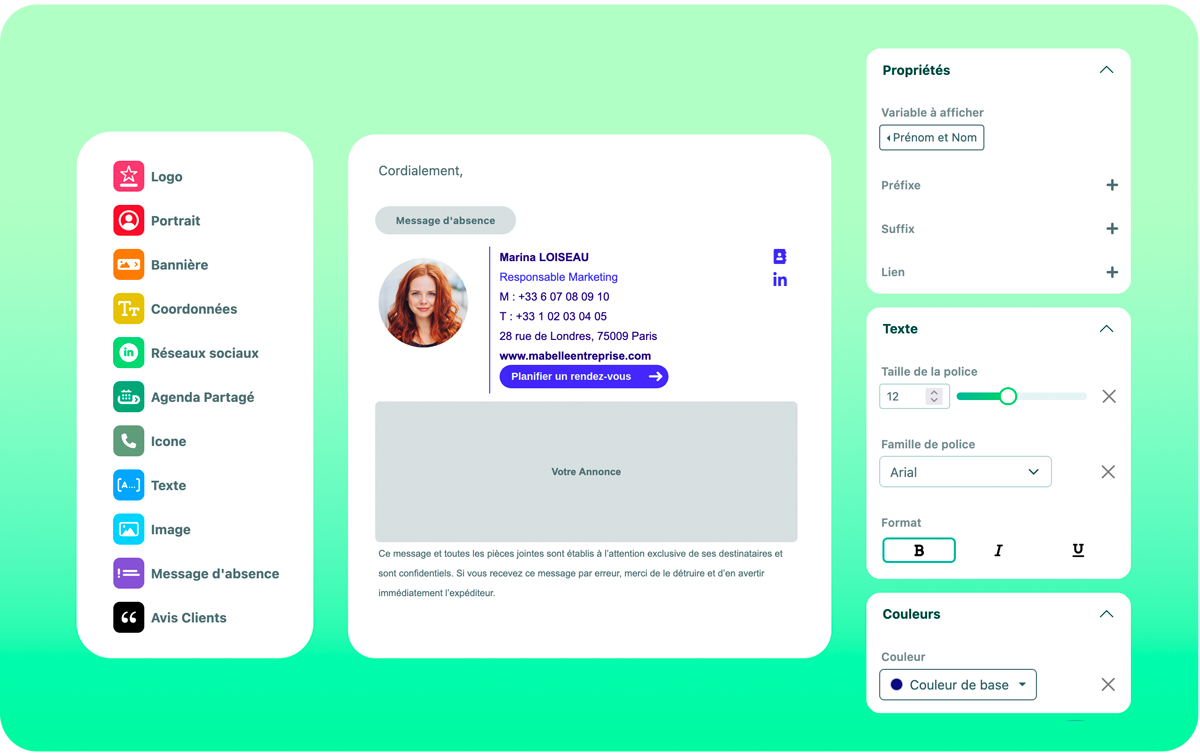
Sigilium offers its users a no-code template editor.
This intuitive interface allows you to quickly create your email signature template by dragging and dropping elements and assigning them the desired characteristics, without any technical expertise in HTML coding.
Define how you want to use the available variables and preview the result on an example. Then apply the template to all or part of your company.
Note: You can also use the HTML editor if you prefer.
In short, designing an email signature template has never been easier! 
The main advantage of the Sigilium email signature editor is that it requires no HTML coding skills.
You don't need to hire a developer or rely on complex software.
In just a few clicks, you can create an email signature tailored to your brand needs while enjoying the same level of precision as the display logic of HTML code.
Sigilium offers a range of fully customizable professional templates.
From color palettes to font choices, you can adjust every detail to ensure your signature perfectly reflects your company's identity.
These templates are designed with display logic: they will only appear if the information is entered by the user.
Thanks to its drag-and-drop functionality, the Sigilium editor is intuitive.
You can easily add or remove elements such as logos, social media icons, phone numbers, disclaimers, and even promotional banners.
A green indicator will appear when adding or removing elements is possible, and a red indicator when it is not.
In Sigilium, for Microsoft 365 users, you can define and apply your template either
in all cases without differentiation
get a different template for internal use
get a different template for responses/transfers
For companies with multiple brands or team types, maintaining consistent email signatures is essential. With Sigilium, you can ensure that every member of your organization uses the same template, guaranteeing a unified image across all communications.
Administrators can define and enforce company-wide email signature rules.
Save time: The no-code editor lets you create an email signature in minutes, eliminating the need for technical setup or lengthy design processes.
Enhanced brand image: With consistent, well-designed signatures, your communications will always reflect a polished brand image, whether you're communicating with clients, partners, or colleagues.
Branding opportunities: Customize your signature to reflect your company's guidelines, creating a stronger brand presence in every email you send.
Improved marketing potential: By adding promotional banners, event invitations, or call-to-action buttons, you can transform your email signature into a powerful marketing tool.
Getting started with the Sigilium email signature template editor is quick and easy.
Here are the steps to begin:
Sign up: Create an account on the Sigilium platform. The interface is intuitive and guides you through each step.
Choose your template: Select from a variety of email signature templates designed for personal or business use.
Personalize your signature: Using the drag-and-drop editor, personalize your signature by adding personal or professional details such as your name, job title, contact information, social media links, logo, and more.
Export and integrate: Once your signature is ready, select the organization(s) to which you want to apply this new signature.
The no-code email signature template editor offers a simple, code-free solution for creating professional, consistent, and effective email signatures.
Whether you're a freelancer or part of a larger team, this editor lets you design signatures that reflect your brand and leave a lasting impression in every email.
With customizable templates, easy integration, and analytics tools, Sigilium empowers professionals to manage their email signatures efficiently and easily.
Discover the Sigilium email signature template editor today and enhance your email communications professionally.
Un doute, une question ?
Vous pouvez décrire votre problème à l'oral en quelques secondes en laissant un message au
+33 1 83 64 02 13
Vous préférez l'écrit ? Nous sommes ravis de vous aider en réponse à votre mail au
