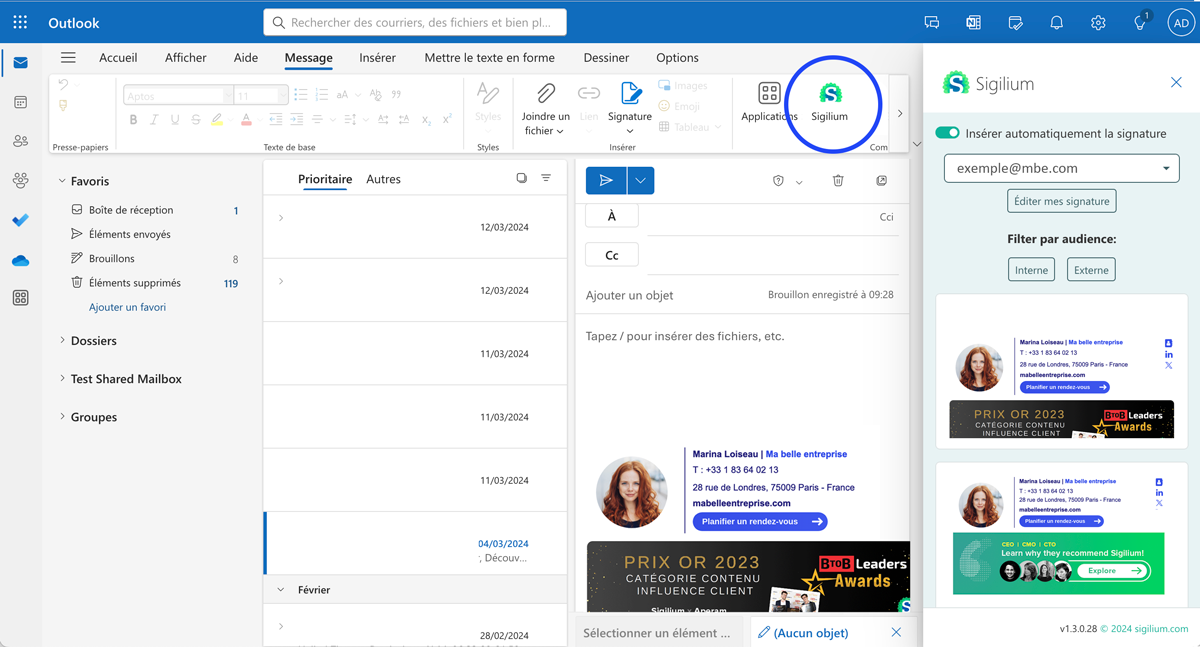
If you use Outlook with Microsoft 365, Sigilium allows you to create and assign different email signatures to the same user. After creating multiple campaigns, users can easily switch between signatures when composing emails. By selecting their preferred signature, users can tailor communication to different audiences without needing to configure anything manually.
In the Campaign menu: click on the green button Create a new campaign
Set the format (text message or banner), link and preview the rendering
At the bottom of the user selection page, you can define whether this banner replaces that of the default email signature, or whether you create a new "secondary" email signature, which is added to the panel of email signatures available for the user. 'user.
(see screenshot below)

For the user, the synchronization of the different email signatures is transparent, there is nothing to do to find them.
When creating a new email, the default email signature is displayed.
To select another banner, simply open the Sigilium email signature panel and select the email signature of your choice.